Rapid Cloud File Manager
- 3.0
- Rating
- 500.00K
- Installs
- Free
- Price

 Analysis by App-foxy
I tested Rapidgator.net File Manager as a practical way to reach files stored on the rapidgator.net service from an Android phone. It is a communication-category app from RapidG apps, but its real value is much narrower than that label might suggest: it is mainly a mobile doorway to an existing file-hosting account rather than a complete replacement for the file tools already built into a phone.
That distinction matters most when a device is shared at home. One person may use it to retrieve a document, another may need to download a video or archive, and someone else may simply be clearing space after a transfer. In those situations, the app can be useful, but only when everyone understands which account is active and where downloaded files are going. My main advice is to treat it as an account-specific file access tool, not as a household file cabinet.
Using it on a shared household device
A realistic example is a family tablet or a phone that moves between several people. A parent might sign in to reach a file already stored on rapidgator.net, download it for offline use, and then hand the device to another household member. The next person can easily assume that the visible files belong to them, even though the app is still connected to the previous user’s account. That is not a flaw unique to this application, but it is a particularly important boundary when the app’s purpose is browsing and downloading remote files.
You May Also Like

 Blood Strike: 2.5 Anniversary
Blood Strike’s Loadouts Turn Every Drop Into a Tactical Gamble
A close look at Blood Strike’s custom loadouts: how fast access to signature weapons reshapes its battle royale rhythm, rewards preparation, and narrows the gap between fights.

 Pandora - Music & Podcasts
Pandora’s Music Is Easy to Start, but Harder to Recover
Pandora’s strength is its low-effort path from a seed to a station. Its weak spot is how much confidence it asks you to place in connection, setup, and quiet recovery.

 8 Ball Pool
 Is Built on Rivalries, Rematches, and Routine
A close look at the rivalries, rematches, shared routines, and unanswered safety questions that turn a quick pool match into a persistent mobile community.

 Samsung Music
’s Quiet Strength Is Playing What You Already Own
Its reach comes less from spectacle than from dependable access to a personal library. That simplicity is both the app’s strongest retention engine and its ceiling.

 AccuWeather: Weather Radar
AccuWeather Review: A Quick, Clear Forecast for Everyday Decisions
For everyday plans, the best forecast is the one you can understand quickly. AccuWeather makes rain timing, radar, and local conditions easy to act on, with a few trade-offs.

 Hill Climb Racing
Why Hill Climb Racing Still Turns Crashes Into One More Run
A tiny car, a bumpy hill and one more upgrade: Hill Climb Racing keeps resurfacing because its simple chaos makes every near-miss feel personal.
More From Our News Desk



I found the most sensible workflow was to decide who owns the active account before opening the app. If the device is personal, that is straightforward. If it is shared, I would avoid leaving the application open on a file list or download screen. Closing the app is not the same as changing the account, so the household should agree on a simple routine: finish the transfer, check the downloaded file, and then sign out or otherwise return control to the account owner using the options available in the app.
This approach also prevents accidental downloads. A child looking for a school document could tap a similarly named archive, while another family member might start a large transfer without realizing that the phone is using a different person’s account. The app is not a family organizer, and I would not use it as one. Its job is direct access to rapidgator.net files, so household coordination has to happen outside the app.
The experience makes more sense for one person who already relies on rapidgator.net and wants to manage files from Android. It is less convincing for a group that wants shared folders, separate profiles, automatic photo backup, or a simple family workspace. Those needs are better served by mainstream cloud-storage apps designed around collaboration and multiple identities.
What the first setup should clarify
Before using it regularly, I would identify the account, the expected download location, and the type of files that will be handled. This sounds basic, but it avoids the most common confusion with mobile file managers: a successful download may not appear inside the app forever. It may be placed in the phone’s download area or another location selected by the application, after which the user needs a separate file browser to rename, move, open, or share it.
I also recommend testing with a small file first. That gives you a chance to see how the app reports progress, where the result appears, and what happens if the screen is locked or the connection changes. I would not begin with an important household archive or a time-sensitive document. A short trial is a better way to learn the app’s behavior than discovering a problem halfway through a large transfer.
The application is free to install, although in-app purchases range from around nine dollars to nearly two hundred forty dollars per item. That makes it especially important to understand what you are paying for before confirming anything. On a shared phone, I would make sure children or guests cannot casually reach a purchase screen, and I would keep the account owner responsible for any transaction. The app’s free entry point is convenient, but the purchase range deserves attention.
Rapidgator.net File Manager supports Android devices running version five or later, so it can fit older hardware that newer file-management tools may leave behind. That broad compatibility is useful for an older spare phone or household tablet. At the same time, an older device may have limited storage, slower background processing, or a less dependable connection. Compatibility means the app can run; it does not guarantee that every older device will handle large downloads comfortably.
Keeping account boundaries clear
The biggest household risk is not technical complexity but mistaken identity. If two people use the same device, they should not assume that the app will automatically separate their files. I would keep one account per person where possible and avoid passing the phone around while a session is open. If the app does not fit that arrangement, a personal device is the safer choice.
This is also why I would not use a shared account for private documents simply because it is convenient. A file-hosting account can contain material that was never meant for every member of the household. The app gives access to the service, but it does not turn a shared Android device into a privacy-managed multi-user workstation. A separate Android profile, a personal phone, or a different storage service may be more appropriate when account separation matters.
For a teenager, I would explain the difference between viewing a file and downloading it. A download creates a local copy that may remain visible in the device’s file browser, media gallery, or sharing menu. Even if the original stays online, the local copy can be opened or forwarded by anyone who later uses the phone. That is a practical privacy lesson, and it is more useful than simply telling a young user not to tap unfamiliar buttons.
Coordinating downloads without confusion
Rapidgator.net File Manager is most helpful when the user already knows the file they need. I would prepare a short naming convention before downloading several items, especially on a shared device. For example, adding a clear project or person label after the download makes it easier to distinguish school material from personal archives. This is not an automated feature of the app; it is a small workflow improvement that prevents the phone’s download folder from becoming a pile of anonymous files.
Another useful habit is to check available storage before starting a large transfer. A remote file may be accessible, but the Android device still needs enough local room to save it. On a household phone, storage can disappear quickly because of photos, messaging attachments, and offline media. I would remove or move completed downloads instead of assuming the app will manage local space for me.
When several people need the same file, I would download it once, verify that it opens correctly, and then share the local copy through the household’s normal method. Repeating the same download for every person wastes time and storage. However, I would only do this for files that everyone is allowed to access. Convenience should not override the account owner’s permission.
Connection changes are another reason to stay organized. A transfer started on home Wi-Fi may behave differently after the phone switches to mobile data or loses signal. I would avoid beginning a large download just before leaving the house, and I would check the progress rather than assuming that a notification means the file is complete. If a file is important, opening it after the transfer is a simple confirmation that the local copy is usable.
These habits reveal both the app’s strength and its limitation. It gives an Android user a direct route to a rapidgator.net file, but it does not replace the planning normally done by a full desktop file workflow. The user remains responsible for naming, storage, sharing, and cleanup.
Age, trust, and everyday supervision
The app is rated for Everyone, which makes it broadly suitable from an age-label perspective. I would still judge suitability by the files and account involved rather than by the label alone. A young user may be perfectly capable of downloading a teacher’s document, while still needing guidance about private archives, unknown files, purchases, and sharing.
For younger children, I would prefer supervised use on a parent’s device or a separate account with only the necessary files available. I would not hand over an already signed-in account and expect the age rating to solve the privacy issue. The rating describes general content suitability; it does not create family controls, account boundaries, or permission rules.
Trust also matters between adults. A shared device can make it unclear who downloaded something, who moved it, or whether a file was removed from local storage. If the material is important, I would keep the account owner involved and use a personal device for sensitive work. Rapidgator.net File Manager is a utility for access, not an audit trail for a household.
The app’s current version is 0.9.9.01, and its release dates back to September 2016. That history does not automatically make it unsuitable, but it does influence my expectations. I would be more cautious about relying on it as the only way to reach an essential file, especially on a device with a newer Android interface or unusual background restrictions. For occasional retrieval, that may be acceptable. For a work process where every transfer must behave predictably, I would keep an alternative method available.
How it compares with familiar alternatives
Compared with the standard Android file manager, this app has a clear advantage: it is aimed at reaching files stored on rapidgator.net rather than only managing files already saved on the phone. If your need begins online, the dedicated app can be more direct than switching between a browser, a login page, and the local file browser.
Compared with a general cloud-storage application, however, it is much less of a household collaboration tool. Services built around shared folders usually make it easier to invite people, keep work separated, synchronize changes, and view a consistent family or team structure. I would choose one of those alternatives for shared photos, jointly edited documents, or ongoing household records.
A browser may be the better option for someone who only needs a rare download and does not want another app installed. The dedicated manager becomes more worthwhile when rapidgator.net is already part of the person’s regular workflow and mobile access saves repeated browser steps. In other words, the choice depends less on the app’s general category and more on whether the user has a recurring reason to access that specific service from Android.
I would also distinguish it from a backup app. Downloading a file to the phone is not the same as automatically protecting the phone’s photos or documents. Anyone looking for continuous backup should choose a product designed for that purpose. Using this application as a backup system would create false confidence because the workflow begins with manually accessing hosted files rather than automatically copying local content.
Who will benefit and who should skip it
I can recommend Rapidgator.net File Manager to an Android user who already stores files on rapidgator.net and wants a straightforward mobile way to retrieve them. It is also reasonable for occasional household use when one clearly identified account owner manages the session and everyone understands that downloaded files become local copies.
I would skip it if the main goal is family synchronization, private multi-user access, automatic backups, or a polished shared workspace. I would also hesitate if the user depends on large, mission-critical transfers and has no alternative access method. The app’s narrow purpose is a benefit when it matches the task, but it becomes a weakness when people expect a complete file-management ecosystem.
My practical setup would be simple: use a personal account, test a small download, note where files are saved, check storage first, rename important items, and remove local copies after they are no longer needed. On a shared device, I would add one more rule: never leave the app open with another person’s account visible. That small boundary prevents more trouble than any clever organizational system.
My household verdict
After using it, I see Rapidgator.net File Manager as a focused utility rather than an all-purpose communication app. It does one useful thing: it helps Android users manage and download files connected to rapidgator.net. For the right account owner, that direct access can be convenient and familiar, particularly on an older compatible device.
The average rating is around three out of five from roughly three thousand ratings, with over five hundred thousand installs and more than one hundred reviews. Those figures suggest a product with a meaningful user base but a mixed reception, which matches my own balanced view: the app can solve a specific problem, yet it asks the user to handle many surrounding details manually.
Because it is free to install and rated for Everyone, it is easy to try, but the purchase range means I would still supervise account use on a shared device. I would recommend it to someone who already has a clear rapidgator.net workflow, not to someone searching for a family cloud platform. If your household needs direct file retrieval and can maintain firm account boundaries, it is worth testing; if you need shared organization and automatic protection, choose a broader alternative.
FAQs for Rapid Cloud File Manager
01What is Rapidgator.net File Manager used for?
Rapidgator.net File Manager is designed to help users manage and organize their files stored on the Rapidgator cloud service. It allows for easy uploading, downloading, and sharing of files while providing a user-friendly interface to keep everything organized. This app is particularly useful for people who need to access their files on the go.
02Is Rapidgator.net File Manager secure?
Yes, Rapidgator.net File Manager prioritizes user security by implementing encryption protocols to protect your files during transfer and storage. Users can also benefit from password-protected sharing options, ensuring that only authorized individuals can access shared content. Always ensure your device is secure to enhance protection.
03What are the main features of Rapidgator.net File Manager?
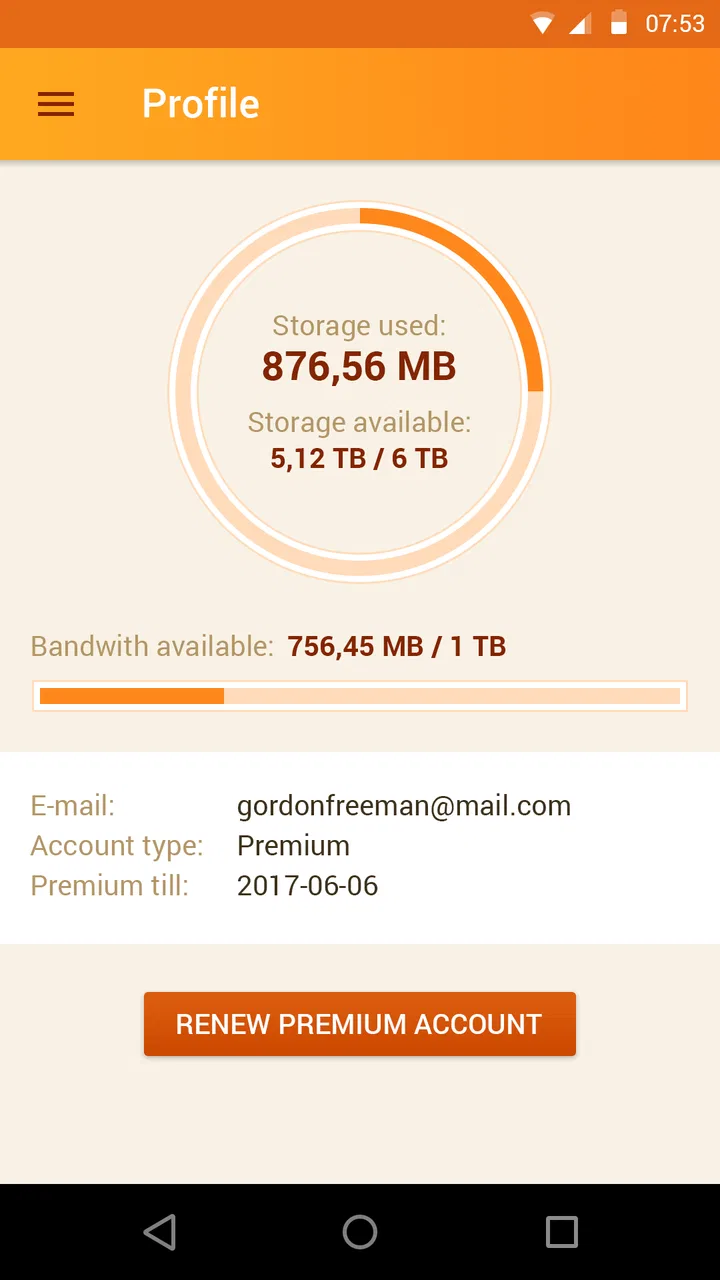
The app offers several key features, including seamless file uploads and downloads, easy sharing options, a user-friendly interface, and comprehensive file management tools. Users can organize files into folders, preview documents, and monitor their storage usage. It's designed to make file handling on Rapidgator's cloud service efficient and straightforward.
04Does Rapidgator.net File Manager support offline access?
Rapidgator.net File Manager primarily functions with an internet connection to access and manage files stored in the cloud. However, users can download files to their device for offline access. This feature is helpful for users who need to work with their files without a constant internet connection.
05What devices are compatible with Rapidgator.net File Manager?
Rapidgator.net File Manager is available for both Android and iOS devices, making it accessible to a wide range of users. The app is designed to function smoothly on smartphones and tablets, providing a consistent experience across different platforms. Always check the app store for the latest compatibility updates.
Pros
- User-friendly interface for easy navigation.
- Secure file transfers with encryption.
- Supports multiple file formats seamlessly.
- Fast upload and download speeds.
- Efficient cloud storage management.
Cons
- Requires a premium account for full features.
- App contains occasional ads for revenue.
- Limited free storage space available.
- No offline access without premium account.
- In-app purchases can be costly.

Rapid Cloud File Manager
Gallery